▶ Click here for information in English.
お知らせ(更新日:2026年10月7日)
- 証明書発行サービス、証明書発行機は下記の期間メンテナンスのため稼働を停止いたします。
学割証は発行日から3ヶ月間有効です。必要な方は早めに発行してください。
2026年11月13日(金)16:00 ~ 2026年11月16日(月)23:59
- 2026年7月1日(水)より、学内証明書発行機ならびにコンビニから、卒業見込証明書(英文)と修了見込証明書(英文)が印刷可能となりました。
在学生(正規生)の各種証明書の発行
証明書発行の流れ
・学内発行(各キャンパスに設置している証明書発行機)
・窓口受取(大学の各部局教務窓口での受取、申請者本人のみ受け取り可能)
・コンビニエンスストア(セブンーイレブン、ファミリーマート、ローソン)
・郵送
※郵送、窓口受取については、学内の証明書発行機もしくはコンビニで出力できない証明書が必要な場合に指定してください。
※操作に関する詳細なマニュアルは証明書発行サービスにログイン後、メニューボタン(画面上部の歯車マーク)からご確認をお願いいたします。
※PDF版の「証明書発行の流れ」はこちら
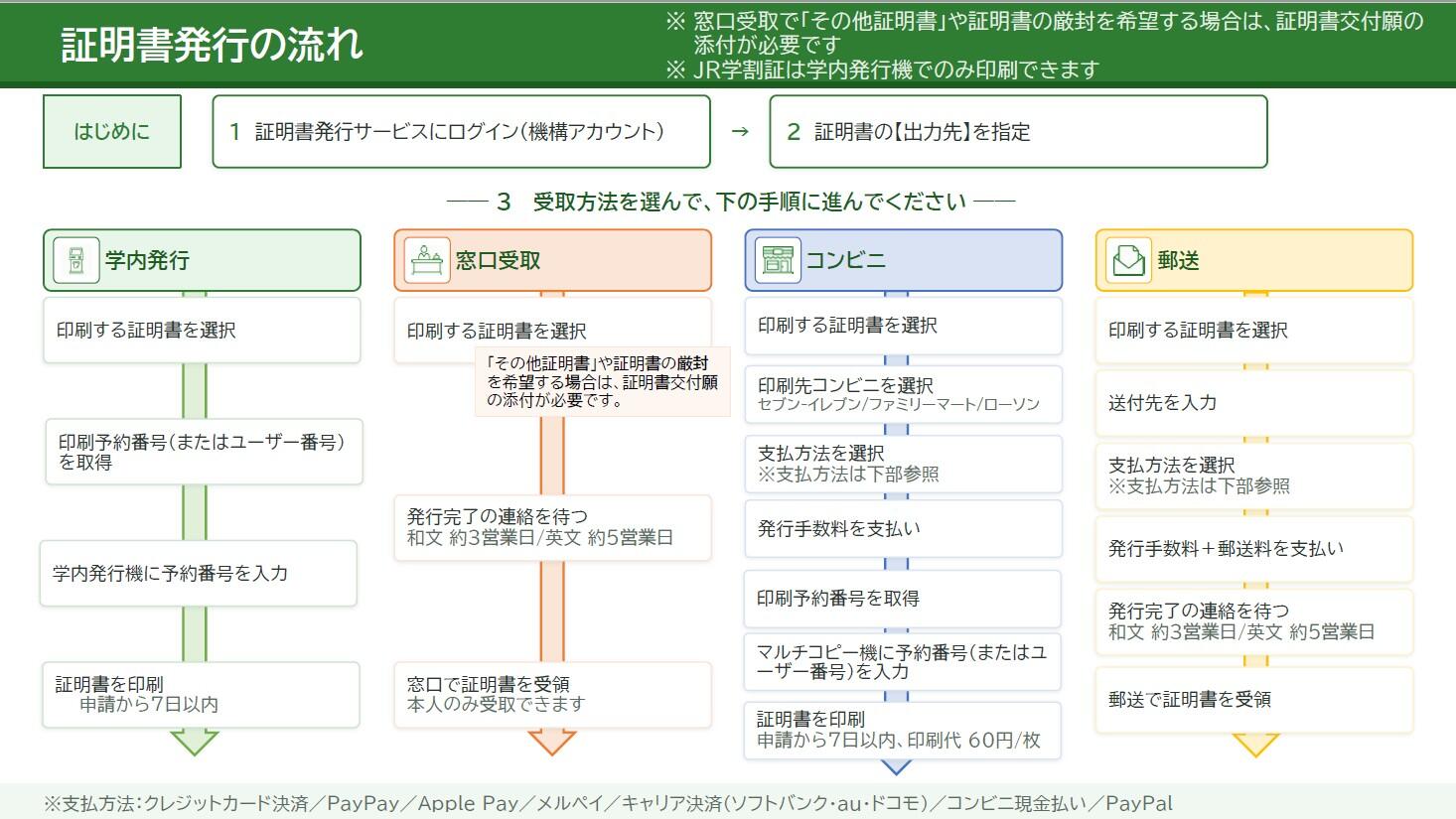
+ 証明書発行機からの印刷手順(学割証(JR)は証明書発行機からのみ印刷が可能です)
1. 機構アカウントで
証明書発行サービスにログインします。詳細なログインマニュアルは
こちらをご確認ください。
2. 「証明書を発行」から「学内発行」を選択します。
3. 「申請証明書選択」から、申請する証明書の部数をプルダウンより選択し、申請します。
4. 登録しているメールアドレス宛に「印刷予約番号」が送信されます。
5. 学内証明書発行機で印刷予約番号を入力し、証明書を印刷します。
+ 窓口受取での受取手順
1. 機構アカウントで
証明書発行サービスにログインします。詳細なログインマニュアルは
こちらをご確認ください。
2. 「証明書を発行」から「窓口受取」を選択します。
3. 「申請証明書選択」から、申請する証明書の部数をプルダウンより選択し、申請します。
※「窓口受取」で「その他証明書」を申請される場合は、証明書交付願(窓口受取 その他証明書用)(
Excel ,
PDF)に必要な証明書種類、部数をご記入のうえ、申請をお願いいたします。ご記入いただいた
証明書交付願(窓口受取 その他証明書用)(
Excel ,
PDF)は申込オプションの「添付ファイル」画面からアップロードをお願いいたします。添付ファイルは、jpeg、PDF、xlsx形式としてください。
4.登録しているメールアドレス宛に証明書の受け渡しに関する連絡が入るまでお待ちください。
※窓口受取は申請者本人のみ受け取り可能です。学生証等本人確認可能な身分証をご持参ください。
※証明書発行後の部局教務担当窓口での保管期限は3か月です。
+ コンビニでの受取手順
1. 機構アカウントで
証明書発行サービスにログインします。詳細なログインマニュアルは
こちらをご確認ください。
2. 「証明書を発行」から「コンビニ」を選択します。
3. 「申請証明書選択」から、申請する証明書の部数をプルダウンより選択し、申請します。
4. 証明書の印刷を行うコンビニを選択します。(セブンーイレブン、ファミリーマート、ローソン)
※選択した以外のコンビニのマルチコピー機からは印刷できませんのでご注意ください。
5. お支払方法を選択し、発行手数料を支払います。
6. 登録メールアドレス宛に、「印刷予約番号」が送信されます。
7. コンビニエンスストアに設置してあるマルチコピー機に「印刷予約番号」を入力します。
※印刷予約番号取得後、7日以内に証明書を印刷してください。8日目の深夜0時をすぎた時点で証明書の印刷ができなくなり、手数料の返金もございません。
※一部の店舗では、マルチコピー機が設置されていない、ネットワークプリントサービスに対応していない場合がございます。
※コンビニのマルチコピー機で印刷する際に、別途印刷代60円/枚が必要となります。
+ 郵送での受取手順
1. 機構アカウントで
証明書発行サービスにログインします。詳細なログインマニュアルは
こちらをご確認ください。
2. 「証明書を発行」から「郵送」を選択します。
3. 「申請証明書選択」から、申請する証明書の部数をプルダウンより選択します。
4. 郵送先の情報等を入力します。
※厳封を希望される場合は、「郵送オプション」の「厳封」の「希望する」にチェックを入れてください。
5. お支払方法を選択し、発行手数料と郵送料を支払います。
6. 登録メールアドレス宛に、郵送申請の受付完了メールが届きます。証明書がご指定の住所に届くまでお待ちください。
証明書発行手数料について
在学生の証明書発行手数料は受け取り方法によって異なります。証明書発行手数料は以下のとおりです。
一度お支払いただいた料金の払い戻しはできませんのでご注意ください。
| 受取方法 |
発行手数料 |
|
学内発行
学内に設置している証明書発行機からの出力
|
無料 |
窓口受取
各部局教務窓口での受取 |
無料 |
| コンビニ発行 |
1枚あたり300円
マルチコピー機利用時に別途印刷代60円/枚が発生
|
| 郵送 |
1枚あたり300円
別途郵送料(封筒代等を含む発送手数料)が発生
|
証明書発行機設置場所と稼働時間について
▶東山キャンパス
・コモンネクサス1階(設置場所MAP) 平日 9:00~17:00
・生協北部購買1階 平日 10:00~19:00
※長期休暇期間中は 平日 10:00~18:00
・生協ブックスフロンテ1階 平日 11:00~17:30
※長期休暇期間中は 平日 11:00~15:00
生協に設置された証明書発行機は生協の営業時間中利用できます。
大学内マップはこちらをご確認ください。各店舗の営業カレンダーは名大生協ホームページをご確認ください。
▶鶴舞キャンパス
・医学部基礎研究棟1階学務課事務室内 平日 8:30~17:15
▶大幸キャンパス
・医学部保健学科本館1階玄関ホール 平日 8:30~17:15
学割証(JR)および通学定期乗車券発行控について
- 学割証(JR)は各種証明書と同様に証明書発行サービスから申請してください。学内の証明書発行機から無料で出力できます。科目等履修生や研究生等の非正規生については学割証(JR)の発行、利用ができませんのでご注意ください。
- 各社公共交通機関で定期券を購入する際に必要な通学定期乗車券発行控は各部局教務担当窓口にて配布しております。申請不要です。
学内の証明書発行機およびコンビニから出力できる証明書について
学内の証明書発行機およびコンビニのマルチコピー機からは以下の証明書が出力できます。
下記以外の証明書が必要な場合には、事前に各学部/研究科の教務担当窓口にご相談ください。
| |
学内証明書発行機 |
コンビニ |
| 学割証(JR) |
〇 |
× |
| 在学証明書(和・英) |
〇 |
〇 |
|
卒業/修了見込証明書(和・英)※1
・英文の卒業/修了見込証明書は2026/7/1から証明書発行機、コンビニから印刷が可能となりました。
|
〇 |
〇 |
| 学業成績証明書(和・英) |
〇 |
〇 |
| 健康診断証明書(和・英)※2 |
〇 |
〇 |
| 過去在籍した課程の学位証明書(和・英) |
〇
※3 |
〇
※3 |
※1 卒業見込証明書は学部4年生(医学部は6年生)のみ、修了見込証明書は博士前期課程の2年生のみ出力できます。また、留学や休学等により卒業(修了)予定年月が延期された場合は、証明書に記載される卒業(修了)見込年月が自動的に1年後の同月へ更新されます。
※2 健康診断証明書は健康診断を受診しないと発行されません。英文については「異常所見なし」かつ「精密検査を受けていない」ことも条件です。発行申請前に健康診断システムから結果を確認してください。英語版の健康診断証明書が学内発行機から出力できない方で証明書が必要な場合は保健管理室に相談してください。
※3 本学の学部、大学院博士前期課程(修士課程)を卒業/修了した方のみ。学内発行機からは無料で、コンビニからは在学生と同じく1通300円で出力可能です。
注意事項
+ 厳封について
厳封については証明書提出先より指示された場合にのみご依頼ください。
(厳封とは証明書の入った封筒に厳封印を押印し、密封することです。厳封済みの証明書は、ご自身で証明書の内容が確認できなくなります。)
厳封を希望される場合は、「郵送」もしくは「窓口受取(その他証明書)」から申請をお願いいたします。
※「窓口受取」で「その他証明書」を申請される場合は、証明書交付願(窓口受取 その他証明書用)(Excel , PDF)に必要な証明書種類、部数をご記入のうえ、申請をお願いいたします。ご記入いただいた証明書交付願(窓口受取 その他証明書用)(Excel , PDF)は申込オプションの「添付ファイル」画面からアップロードをお願いいたします。厳封を希望される場合は、申請書の「備考欄」に記載をお願いいたします。
+ 外務省(外務本省及び在外公館)への提出について
外務省では偽造防止の透かしの入った証明書しか受け付けていないため、外務省へ提出する証明書については学内発行機、コンビニのマルチコピー機は利用せず、申請時に「郵送」「窓口受取」での受け取りを選択してください。
+ 国費外国人留学生証明書の申請方法ついて
国費外国人留学生証明書は証明書発行サービスで下記の通り申請をお願いいたします。教務担当窓口への事前連絡不要です。
〇窓口受取の場合
・"国費外国人留学生証明書"の選択肢がある場合、必要枚数を指定して申請をお願いいたします。
・"国費外国人留学生証明書"の選択肢がない場合、"その他の証明書"を選択のうえ、証明書交付願(窓口受取その他証明書用)を添付のうえ申請をお願いいたします。
〇郵送受取の場合
"その他の証明書"の備考欄に"国費外国人留学生証明書"とご記入のうえ申請をお願いいたします。
+ 窓口受取での「その他証明書」の申請方法について
窓口で「その他証明書」を受け取る場合は、証明書交付願(窓口受取その他証明書用)(Excel , PDF)に必要な証明書種類、部数をご記入のうえ、申請をお願いいたします。ご記入いただいた証明書交付願(窓口受取 その他証明書用)(Excel , PDF)は申込オプションの「添付ファイル」画面からアップロードをお願いいたします。添付ファイルは、jpeg、PDF、xlsx形式としてください。
+ 問い合わせ
- オンライン証明書発行サービス及び支払い方法に関するお問い合わせ先:
証明書発行サービスコールセンター(24時間対応):06-6809-4327
- 証明書に関するお問い合わせ先:
各学部・研究科の教務担当窓口にお尋ねください。 名大ポータルの学務タブ内“各種手続き”もしくはこちらに連絡先を掲載しています。
- 学内の証明書発行機の利用時のトラブル:
発行機に掲示している問い合わせ先をご確認ください。
証明書を受け取られた方へ(企業の採用担当者の方へ)
学内の証明書発行機およびコンビニのマルチコピー機から出力した各種証明書には、POPITAの技術により偽造防止が施されています。
POPITAによる真正性の確認方法はこちらをご覧下さい。
※2025/7/1以降、「POPITA」アプリは使用できなくなります。ブラウザから「POPITA」へアクセスしてください。
在学生(非正規生)の各種証明書の発行
各学部・研究科に所属する非正規生については、証明書発行サービスから申請が可能です。
学内の証明書発行機およびコンビニのマルチコピー機からは健康診断証明書のみ出力が可能となります。
健康診断証明書以外の証明書については、郵送または窓口受取対応で発行いたしますので、その他の証明書として申請をお願いいたします。
また、各学部・研究科以外の組織に所属する非正規生については、証明書発行サービスを利用できませんので、受け入れ先の事務室に直接ご相談ください。
Notification (Last Updated: October 7, 2026)
- The Certificate Issuance Service and Certificate Issuing Machines will be unavailable during the following period due to scheduled maintenance.
Certificate of Student Discount for JR is valid for 3 months from the date of issue.
Maintenance Period: November 13, 2026 (Fri.), 4:00 p.m. – November 16, 2026 (Mon.), 11:59 p.m.
- From Wednesday, July 1, 2026, Certificates of Expected Graduation (English, BA or MA) can be printed from Certificate Issuing Machines and multi-functional copy machines at convenience stores.
Information about Certificates for regular students
Application Process for Certificate Issuance
Certificates can be received by the following methods.
・Issuing Machine(Certificate Issuing Machines located on each campus)
・University Counter (Pick-up at the Student Affairs Office of your school/faculty,Only the applicant may collect the certificate. )
・Convenience store (7-Eleven, FamilyMart, Lawson)
・Sending by post
※Please select "Sending by post" or "University Counter" when you need a certificate that cannot be printed out from "Issuing Machine" or "Convenience store".
※For detailed operating instructions, please log in to the Certificate Issuance Service and refer to the User Manual from the menu button (gear icon) at the top of the screen.
※Click here for the PDF version of the Certificate Issuance Process.
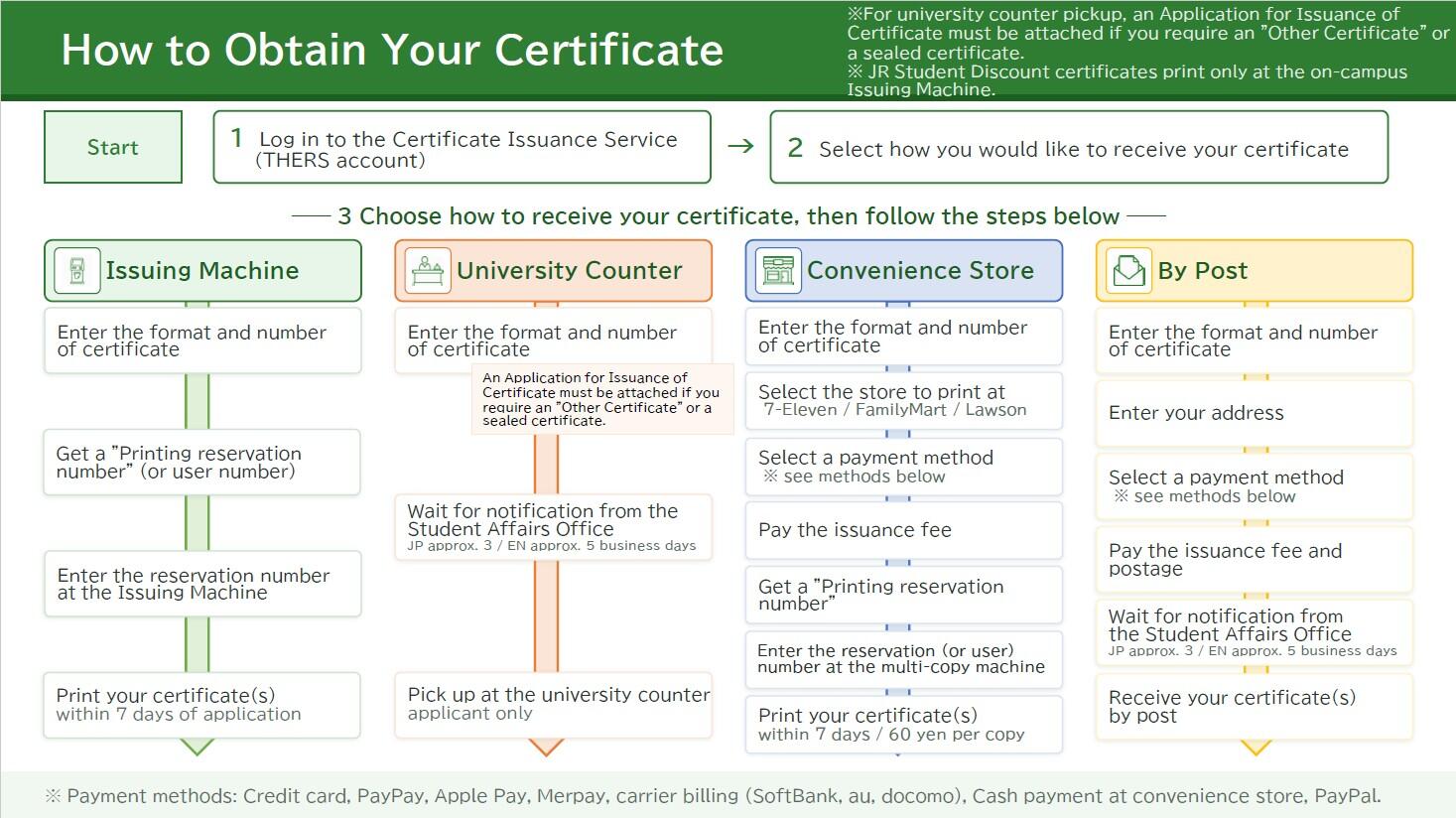
+ Printing Instructions Using a Certificate Issuing Machine
1. Log in to the
Certificate Issuance Service using your THERS Account. For detailed login instructions, please refer to the login manual available
here.
2. Select “Issue Certificate” and then choose “Issuing Machine.”
3. Under “Select application certificate,” choose the number of copies you wish to apply for from the drop-down menu and submit your application.
4. A “Printing reservation number” will be sent to your registered email address.
5. Enter the Printing reservation number at a Certificate Issuing Machine on campus and print your certificate.
+ Procedure for Receiving Certificates at the Student Affairs Office
1. Log in to the
Certificate Issuance Service using your THERS Account. For detailed login instructions, please refer to the login manual available
here.
2. Select “Issue Certificate” and then choose “University Counter.”
3. Under “Select application certificate,” choose the number of copies you wish to apply for from the drop-down menu and submit your application.
※To receive “Other Certificates” at the university counter, Application for Issuance of Certificate[Pick up at the university counter for Other Certificates only](
Excel,
PDF)with the required certificate type and number of copies, and submit your application. Please upload the completed Application for Issuance of Certificate[Pick up at the university counter for Other Certificates only] (
Excel,
PDF)via the “Attachment” screen in the application options. Attachments must be in jpeg, PDF, or xlsx format.
4. Please wait until you receive a notification at your designated email address informing you that your certificate is ready for collection.
※Certificates can only be collected by the applicant in person. Please bring your student ID card when picking up your certificate.
※Certificates will be kept at the Student Affairs Office of each (Graduate) School for three months after issuance.
+ Printing Instructions for Convenience Store Multi-Function Copy Machines
1. Log in to the
Certificate Issuance Service using your THERS Account. For detailed login instructions, please refer to the login manual available
here.
2. Select “Issue Certificate” and then choose “Convenience Store.”
3. “Under “Select application certificate,” choose the number of copies you wish to apply for from the drop-down menu and submit your application.
4. Select the convenience store where you would like to print your certificate (7-Eleven, FamilyMart, or Lawson).
※Please note that certificates cannot be printed from multi-function copy machines at convenience stores other than the one you selected.
5. Select a payment method and pay the certificate issuance fee.
6. A “Printing reservation number” will be sent to your registered email address.
7. Enter the “Printing reservation number” on the multi-function copy machines installed at the convenience store.
※Please print your certificate within 7 days after getting "Printing reservation number" after midnight on the 8th day, you will not be able to print your certificate and the fee will not be refunded.
※Please note that some convenience store locations may not have a multi-function copy machines installed or may not support the Network Print Service.
※Please note that an additional printing fee of JPY 60 per page will be charged when printing certificates at a convenience store multi-function copy machines.
+ Procedures for Receiving Certificates by Mail
1. Log in to the
Certificate Issuance Service using your THERS Account. For detailed login instructions, please refer to the login manual available
here.
2. Select “Issue Certificate” and then choose “Sending by post.”
3. Under “Select application certificate,” choose the number of copies you wish to apply for from the drop-down menu and submit your application.
4. Enter the mailing address and other required information.
※If you would like your certificate(s) to be sealed in an official envelope, please check “Wished” for “Sealed up” under “Mailing Options.”
5. Select a payment method and pay the certificate issuance fee and postage.
6. A confirmation email for your mailing request will be sent to your registered email address. Please wait until the certificate is delivered to the address you specified.
Certificate Issuance Fees
The certificate issuance fee for current students varies depending on the receipt method selected. The applicable fees are listed below.
Please note that fees cannot be refunded once payment has been completed.
|
Methods of Receipt
|
Issuance Fee
|
|
Issuing Machine
Certificate Issuing Machines located on each campus
|
Free |
|
University Counter
Pick-up at the Student Affairs Office of each (Graduate) School
|
Free |
| Convenience store |
300 yen / 1 copy
A separate printing fee of 60 yen will be charged when using a multi-copy machine for convenience store issuance.
|
| Sending by post |
300 yen / 1 copy
A separate Shipping fee (including envelope, etc.) will be charged.
|
Certificate Issuing Machine Locations and Operating Hours
▶Higashiyama campus
・Common Nexus(コモンネクサス棟、コモネ)(MAP):Weekdays 9:00 AM~5:00 PM
・NU CO-OP North Shops(生協北部購買 ): Weekdays 10:00 AM~7:00 PM
※During long vacation periods : Weekdays 10:00 AM~6:00 PM
・Books Fronte(生協ブックスフロンテ ):Weekdays 11:00 AM~5:30 PM
※During long vacation periods : Weekdays 11:00 AM~3:00 PM
Please click here for a map of the university.
Certificate Issuing Machines located at Nagoya Univ CO-OP are available during CO-OP business hours.
Please check the Nagoya Univ CO-OP website for the business calendar of each store.
▶Tsurumai campus
・Basic Medical Reserch Building, 1st floor, Student Affairs Office: Weekdays 8:30 AM~5:15 PM
▶Daiko campus
・School of Medicine (Main Building), Entrance Hall:Weekdays 8:30 AM~5:15 PM
Certificate of Student Discount for JR and "Tugaku Teiki Zyosyaken Hakko Hikae(通学定期乗車券発行控)"
- Please apply for Certificate of Student Discount for JR from Certificate Issuance Service as well as various certificates. You can print out the certificate from Certificate Issuing Machine on campus free of charge.
Non-regular students such as non-degree students and research students cannot be issued and use the Certificate of Student Discount for JR.
- "Tugaku Teiki Zyosyaken Hakko Hikae(通学定期乗車券発行控)" is required when purchasing a commuter pass for each company's public transportation system.
Certificates that can be printed from Certificate Issuing Machine on campus or convenience stores
The following certificates can be output from Certificate Issuing Machines on campus and convenience stores.
※If you need certificates other than those listed below, contact the Student Affairs Office of each (Graduate) School in advance.
| |
Certificate Issuing Machine on campus |
Convenience stores |
| Certificate of Student Discount for JR |
〇 |
× |
| Student Status Certificate (JP/EN) |
〇 |
〇 |
|
Certificate of Expected Graduation (BA,MA) (JP/EN)※1
・English Certificates of Expected Graduation can be printed from Certificate Issuing Machines and multi-functional copy machines at convenience stores starting July 1, 2026.
|
〇 |
〇 |
| Transcripts (JP/EN) |
〇 |
〇 |
| Certificate of Medical Examination (JP/EN) |
〇 |
〇 |
| Certificate for a course you were enrolled in in the past (JP/EN) |
〇
※3 |
〇
※3 |
※1 The Certificate of Expected Graduation is available only to 4th year undergraduate students (medicine : 6th year), and 2nd year Master's students.
If your expected graduation date is postponed due to study abroad, a leave of absence, or other reasons, the expected graduation month shown on the certificate will be automatically updated to the same month in the following year.
※2 Certificates of Medical Examination are issued only to students who have undergone the university medical examination. For the English version, the additional requirements are that no abnormal findings have been reported and that no detailed medical examination has been required. Please check your examination results through the Medical Examination System before applying for a certificate.If you are unable to print an English Certificate of Medical Examination from a Certificate Issuance Machine and require the certificate, please contact the Health Administration Office.
※3 Only for students who have graduated the undergraduate or master's degree programs of the University. The same as for current students, you can print out the certificate from Certificate Issuing Machines for free, or from convenience stores for 300 yen per copy.
Notice
+ About Sealed Certificates
Please request a sealed certificate only if it has been specifically required by the organization to which you are submitting the certificate.
A sealed certificate is placed in an envelope, which is then officially stamped and sealed. Once sealed, you will no longer be able to verify the contents of the certificate yourself.
If you require a sealed certificate, please apply through either “Sending by post” or “University Counter”.
※When applying for “Other Certificates” under “University Counter,” please complete the Application for Issuance of Certificate[Pick up at the university counter for Other Certificates only]( Excel, PDF) by specifying the type and number of certificates required, and submit it with your application. The completed form should be uploaded via the “Attachment” section under Application Options.If you require a sealed certificate, please indicate this in the “Remarks” section of the application form.
+ Submission to the Ministry of Foreign Affairs of Japan
The Ministry of Foreign Affairs only accepts certificates with anti-counterfeiting watermarks. Therefore, for certificates to be submitted to the Ministry of Foreign Affairs, do not use Cerificate Issuing Machines or convenience store multi-functional copy machine. When applying, please select either “Sending by post” or “University Counter” .
+ How to Apply for a Japanese Government (MEXT) Scholarship Certificate
Please apply for a Japanese Government (MEXT) Scholarship Certificate through the Certificate Issuance Service as described below. No prior contact with your Student Affairs Office is required.
+ How to Apply for “Other Certificates” for University Counter
To receive “Other Certificates” at the university counter, Application for Issuance of Certificate[Pick up at the university counter for Other Certificates only](Excel, PDF)with the required certificate type and number of copies, and submit your application. Please upload the completed Application for Issuance of Certificate[Pick up at the university counter for Other Certificates only](Excel, PDF) via the “Attachment” screen in the application options. Attachments must be in jpeg, PDF, or xlsx format.
+ Contact
- For inquiries regarding the online Certificate Issuance Service and payment methods:
Certificate Issuance Service Call Center (24-hour service): 06-6809-4327
- For details of certificates:
Please contact Student Affairs Division of each (Graduate) School.
Contact information is listed under "Procedure" (Nagoya University (NU) Portal or here.
- For Certificate Issuing Machine on campus:
In case of trouble with the Certificate Issuing Machine, please check the contact information posted on the machine.
For those who have received a certificate
If you receive a certificate issued by the convenience store, you can use POPITA technology to check the authenticity of the certificate. Click here for more details.
※The “POPITA” application will no longer be available after July 1, 2025. Please access “POPITA” from your brows.
Information about Certificates for non-regular students
Non-regular students enrolled in each undergraduate/graduate school can apply through the Certificate Issuance Service.
Only Certificate of Medical Examination can be printed from the Certificate Issuing Machines and convenience store multi-function copiers.
For certificates other than Certificate of Medical Examination, we issue them by mail or picked up at the counter. Please apply for them as other certificates. Additionally, non-regular students enrolled in the organizations outside of undergraduate/graduate school cannot use Certificate Issuance Service. Please contact the administrative office of your host department directly.